
Microlet Next Lancing Device User Guide
Instructional Insert
For Fingertip and Palm Testing
- Lancet ejector for safe lancet disposal.
- Black/white adjustable endcap for fingertip testing only.
- Clear AST endcap for alternative site testing only.
- The MICROLET®NEXT lancing device and MICROLET® lancets are used to draw capillary blood from the fingertip or palm for blood glucose testing.
Intended Use
The MICROLET®NEXT lancing device is intended for collecting capillary blood from the fingertip or palm for blood glucose testing or other testing utilizing small amounts of blood.
The MICROLET®NEXT lancing device is for single-patient use. The MICROLET®NEXT lancing device is used with disposable, sterile MICROLET® lancets. The MICROLET®NEXT lancing device with the MICROLET® lancet are intended for collecting fingertip capillary blood from persons age two years and older. The alternative site testing endcap is intended for collecting capillary blood from the palm in adults only.
Warnings
- Ask your health care professional if Alternative Site Testing (AST) is right for you.
- Do not calibrate a continuous glucose monitoring device from an AST result.
- Do not calculate an insulin dose based on an AST result.
Do not use AST under the following conditions:
- If you think your blood sugar is low (hypoglycemia).
- When blood sugar is changing rapidly (after a meal, insulin dose, or exercise).
- If you are unable to feel symptoms of low blood sugar (hypoglycemic unawareness).
- If you get alternative site blood sugar results that do not agree with how you feel.
- During illness or times of stress.
- If you will be driving a car or operating machinery.
- The MICROLET®NEXT lancing device is intended for single-patient use. It should not be used for assisted blood draws by health care providers or at health care provision sites, and should never be shared with anyone else, even a family member, due to risk of infection.
- The lancing device is for use only on a single patient. Disinfect reusable components according to these instructions between each use.
- Do not use on more than one patient. Improper use of blood lancets or the lancing device can increase the risk of inadvertent transmission of bloodborne pathogens, particularly in settings where multiple patients are tested. The cleaning and disinfection instructions for this device are intended only to reduce the risk of local use site infection; they cannot render this device safe for use for more than one patient.
- The lancet is for use only on a single patient. Discard the entire lancet after use. Used lancets are not sterile. Use a new sterile lancet each time you test.
- Used lancets must be safely discarded after a single use. Always dispose of used test strips and lancets as medical waste or as advised by your health care professional.
- Always wash your hands with soap and water and dry them well before and after testing or handling the meter, lancing device, or test strips.
- Keep out of reach of children. This kit contains small parts that could cause suffocation if accidentally swallowed.
- Lancet remains sterile until the protective cap is removed. Do not use if the lancet is damaged or opened unintentionally. Dispose as medical waste to prevent any possible injury.
- If an individual is under the age of 18, the lancing device and lancet must be used by an adult or under the supervision of the adult.
The Microlet®Next Lancing Device
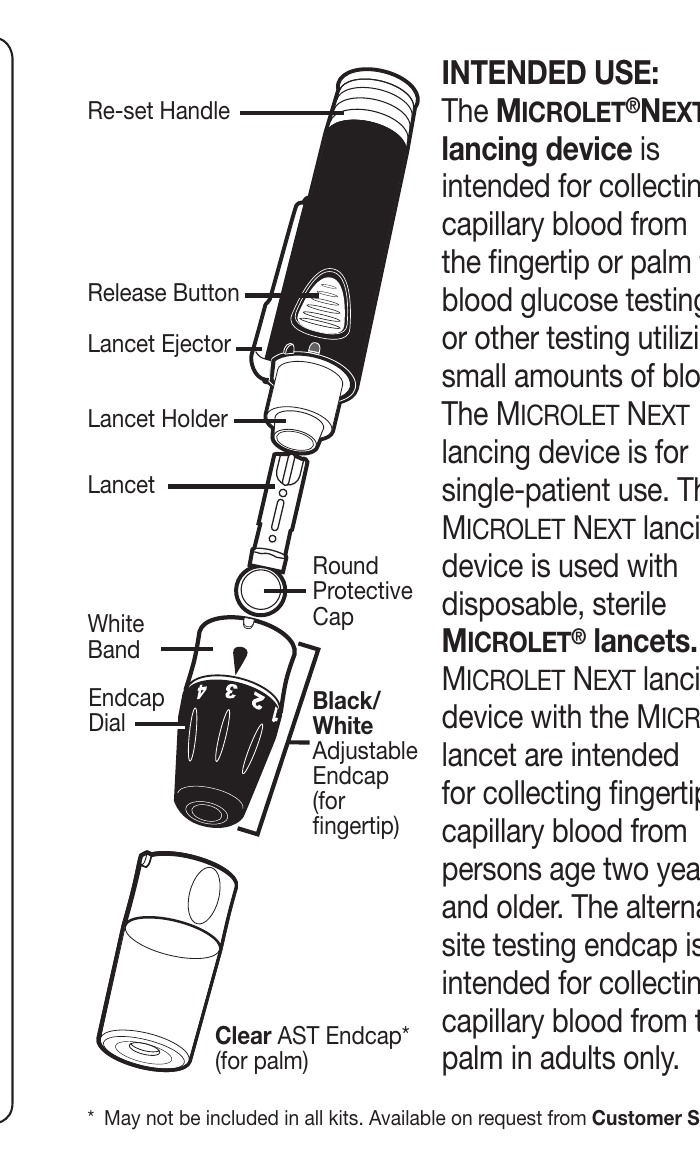
- Re-set Handle
- Release Button
- Lancet Ejector
- Lancet Holder
- Lancet — with white band and round protective cap
- Endcap Dial
- Black/White Adjustable Endcap (for fingertip)
- Clear AST Endcap (for palm) — may not be included in all kits. Available on request from Customer Service.
Prepare the Lancing Device
Before using the lancing device for the first time on children, ask your healthcare professional. Start with the shallowest puncture depth. If the puncture depth is too deep, the puncture can injure children.
- Wash hands and the puncture site with soap and warm water. Rinse and dry well.
- Unlock the endcap. Twist the white band so the white raised mark and black indented mark line up as shown. ("Click" to unlock.)
- Pull off the endcap.
- Loosen the round protective cap on the lancet by rotating the cap ¼ turn, but do not remove the cap.
- Insert the lancet firmly into the lancing device. Push until the lancet comes to a complete stop.
- Carefully twist off the round protective cap. Save the cap for disposing of the used lancet.
Set the Blood Drop — Puncture Depth
Fingertip testing: Use the black/white adjustable endcap. Do not use the clear AST endcap.
- Attach the black/white adjustable endcap.
- Lock the endcap. Twist the white band until you hear or feel a click and the white and black raised marks line up as shown. ("Click" to lock.)
- Rotate the endcap dial to adjust the puncture depth (1.25 mm to 2.75 mm). The difference between each setting is 0.4 mm or less. The amount of pressure applied to the puncture site also affects puncture depth.
| Setting | Puncture Depth (mm) | Setting | Puncture Depth (mm) |
|---|---|---|---|
| 1 | 1.25 | 4 | 2.38 |
| 2 | 1.65 | 5 | 2.75 |
| 3 | 2.00 |
Shallowest Puncture: 1.25 mm · Deepest Puncture: 2.75 mm
Get the Blood Drop — Fingertip
- Pull back the re-set handle to prepare the lancing device. The release button is raised when the lancing device is primed.
- Press the lancing device firmly against the side of the finger and press the release button UNTIL THE DEVICE CLICKS. ("Click") (If the device does not puncture, re-set by repeating Step 1.)
- Do not take the device away from your finger. Maintain steady pressure until a small, round blood drop forms under the clear endcap.
- Stroke your hand and finger toward the puncture site to form a drop of blood. Do not squeeze around the puncture site.
- Test immediately after you have formed a small, round blood drop.
- Wipe the puncture site with a clean, dry tissue and maintain pressure on the site until the bleeding stops.
Get the Blood Drop — Palm
Alternative Site Testing (AST) Palm. Use the clear AST endcap. This endcap is not recommended for pediatric population. (Puncture depth = 3.33 mm, non-adjustable.)
- Insert the lancet as described in Prepare the Lancing Device.
- Attach and lock the clear AST endcap. Twist the white band until you hear a click, and the white and black raised marks line up as shown. ("Click" to lock.)
Caution
Do not use the clear AST endcap on your fingertips.
- Select a puncture site from a fleshy area on the palm. Avoid veins, moles, bones, and tendons.
- Pull back the re-set handle to prepare the lancing device. The release button is raised when the lancing device is primed.
- Press the lancing device firmly against the puncture site, then press the release button UNTIL THE DEVICE CLICKS. (If the device does not puncture, reset by repeating Step 4.)
- Do not take the device away from your palm. Maintain steady pressure until a small, round blood drop forms under the clear endcap.
- Lift the lancing device straight up and away from the skin without smearing the blood drop.
- Test immediately.
Caution
Do not test the blood sample from palm if you get:
- Smeared blood
- Runny blood
- Clotted blood
- Clear fluid mixed with the blood
- Wipe the puncture site with a clean, dry tissue and maintain pressure on the site until the bleeding stops.
Eject / Dispose of the Lancet
Used lancets must be safely discarded after a single use. Always dispose of used lancets as medical waste or as advised by your health care professional.
- Carefully remove the endcap from the lancing device. Twist the white band of the endcap so the white raised mark and the black indented mark line up. Pull off the endcap. ("Click" to unlock.)
- Place the round protective cap that you saved onto a flat surface. With the used lancet still in the lancing device, push the lancet into the center of the cap.
- Point the device toward a container for sharp objects (an empty plastic bottle with a lid, for example). Label the container properly and keep the container out of the reach of children.
- Push the grey lancet ejector forward until the lancet falls into the container, then slide ejector back. Do not use your fingers to remove the lancet from the lancing device.
- Attach and lock the endcap. Twist the white band to lock.
Cleaning Your Lancing Device
Supplies Needed for Cleaning:
- Super Sani-Cloth germicidal wipes
- Remove the endcap and eject the lancet, if present.
- Clean the lancing device body with Super Sani-Cloth germicidal wipes until all soil is removed.
- Clean the endcap inside and outside until all soil is removed.
- Visually inspect the lancing device body and endcap for any residual soil. Repeat steps 2 and 3 if any soil is still visible.
- Allow to air dry.
Disinfecting Your Lancing Device
Supplies Needed for Disinfecting:
- Super Sani-Cloth germicidal wipes
- Timing device
- Before disinfecting, clean your lancing device as described in Cleaning Your Lancing Device.
- Get a new Super Sani-Cloth germicidal wipe.
- Set timer for 2 minutes and start timing.
- LANCING DEVICE BODY: Wipe continuously. You must wipe all surfaces of the body and keep them wet for 2 minutes.
- Set timer for 2 minutes and start timing again.
- ENDCAP: Wipe the endcap continuously. You must wipe the inside and outside and keep them wet for 2 minutes.
- Allow lancing device body and endcap to air dry.
The lancing device is being operated by anyone who is providing testing assistance to a second person should wear gloves and the device should be disinfected prior to use to reduce the risk of transmitting blood-borne disease.
Super Sani-Cloth germicidal wipes containing 0.55% isopropyl alcohol and 0.5% quaternary ammonium chloride. The wipes are proven safe for use with the device.
Cleaning involves the removal of visible dirt and debris, but does not reduce the risk for transmission of infectious disease.
Disinfecting (if performed properly) reduces the risk of transmitting infectious diseases.
Super Sani-Cloth germicidal wipes are available for purchase online. For more information, call Customer Service at 1-800-348-8100, available Monday through Sunday, 8:00 am through 12:00 Midnight, Eastern Time.
Note: Do not use bleach (sodium hypochlorite).
Signs of Deterioration
Your lancing device has been tested for 3,650 cycles of the cleaning and disinfection procedure (5 cycles per day for 2 years). The lancing device has been demonstrated to withstand 2 years of cleaning and disinfection without damage. However, if your device malfunctions for any reason, contact Customer Service at 1-800-348-8100, available Monday through Sunday, 8:00 am through 12:00 Midnight, Eastern Time to troubleshoot and provide a solution.
Storage
Store your lancing device in your meter carrying case.
Warranty: Your lancing device is warranted for 2 years.
Customer Service & Contact Information
Distributed by:
Ascensia Diabetes Care US Inc.
5 Wood Hollow Road
Parsippany, NJ 07054
Tel: 1-800-348-8100
8:00 am to 12:00 am (ET)
Español: Para instrucciones en Español comuníquese a la línea del servicio al cliente 1-800-348-8100 o visite la página www.diabetes.ascensia.com.
If you need assistance or have questions about blood sugar testing, please contact Customer Service at 1-800-348-8100, available Monday through Sunday, 8:00 am through 12:00 Midnight, Eastern Time.
For information on patents and related licenses, see: www.patents.ascensia.com
MICROLET®NEXT lancing device made in Poland.
Trademarks: Ascensia, the Ascensia Diabetes Care logo, and Microlet are trademarks and/or registered trademarks of Ascensia Diabetes Care Holdings AG. All other trademarks are properties of their respective owners and are used solely for informative purposes. No relationship or endorsement should be inferred or implied.
